Building a custom fzf picker
With the addition of more machines into my homelab my SSH config grew quite large. SSHing into one of my machines is something I do daily, and while the config and keys make it easy, I wanted something faster. I already use fzf heavily for terminal history and directory switching. Since fzf follows the Unix philosophy and does exactly one thing well, fuzzy finding, what gets searched is entirely up to you. So I wrote a small script that fuzzy-finds SSH targets from my config.
Parsing the SSH config
The script reads ~/.ssh/config and extracts all non-wildcard Host entries using awk:
mapfile -t hosts < <(
  awk '/^Host / {for(i=2;i<=NF;i++) if ($i !~ /\*/) print $i}' "$ssh_config"
)
The !~ /\*/ filter drops catch-all patterns like Host * which are configuration defaults rather than actual targets. Each matching token becomes an element in the hosts array.
The picker
With the host list ready, fzf takes over. The script behaves differently depending on the environment.
Inside tmux, it uses fzf-tmux to open a centered popup at 40% of the screen:
selected_host=$(printf '%s\n' "${hosts[@]}" | fzf-tmux -p 40%,40% \
  --gutter=' ' \
  --color=current-fg:blue \
  --color=hl:yellow \
  --no-sort \
  --border-label ' ssh hosts ' \
  --prompt '> ' \
)
Outside tmux, it falls back to inline fzf with --height=40% --reverse.
Opening the session
Once a host is selected, the script opens it in a named tmux session:
if [[ -n "${TMUX-}" ]]; then
  tmux new-session -d -s "$selected_host" "ssh $selected_host"
  tmux switch-client -t "$selected_host"
else
  exec tmux new-session -s "$selected_host" "ssh $selected_host"
fi
When already inside tmux, it creates the session detached first and then switches to it. This avoids the nested tmux situation while still landing in a dedicated session per host. When called from outside tmux it starts a new tmux session directly in the foreground.
WezTerm integration
If the script is running inside a WezTerm pane (detected via $WEZTERM_PANE and $WEZTERM_UNIX_SOCKET), it delegates to WezTerm's own SSH workspace picker instead by sending a user-var event via an OSC escape sequence:
printf '\033]1337;SetUserVar=open-wezterm-ssh-picker=%s\007' "$(printf '1' | base64)"
This triggers a Lua plugin on the WezTerm side that handles the picker natively, keeping the experience consistent with the rest of the WezTerm workspace workflow. I also went ahead and created a keybinding for it so I can quickly toggle the picker:
local wezterm = require("wezterm")
local sessionizer = require("plugins.sessionizer")

local M = {}

local function spawn_ssh_workspace(window, pane, host)
  local ws_name = "ssh:" .. host
  window:perform_action(
    wezterm.action.SwitchToWorkspace({
      name = ws_name,
      spawn = {
        label = "SSH " .. host,
        cwd = wezterm.home_dir,
        args = { "ssh", host },
      },
    }),
    pane
  )
end

local ssh_workspace_schema = {
  options = {
    title = "Choose SSH Host",
    prompt = "SSH host: ",
    always_fuzzy = true,
    callback = function(inner_window, inner_pane, id, _)
      if id then spawn_ssh_workspace(inner_window, inner_pane, id) end
    end,
  },
  sessionizer.SSHHosts {},
}

function M.run_picker(window, pane)
  window:perform_action(sessionizer.show(ssh_workspace_schema), pane)
end

function M.show_picker()
  return wezterm.action_callback(M.run_picker)
end

wezterm.on("ssh_workspace_picker", function(window, pane)
  M.run_picker(window, pane)
end)

wezterm.on("user-var-changed", function(window, pane, name, value)
  if name == "open-wezterm-ssh-picker" then
    M.run_picker(window, pane)
  end
end)

return M

// ...
table.insert(config.keys, { key = 's', mods = 'SUPER|SHIFT', action = ssh_picker.show_picker() })
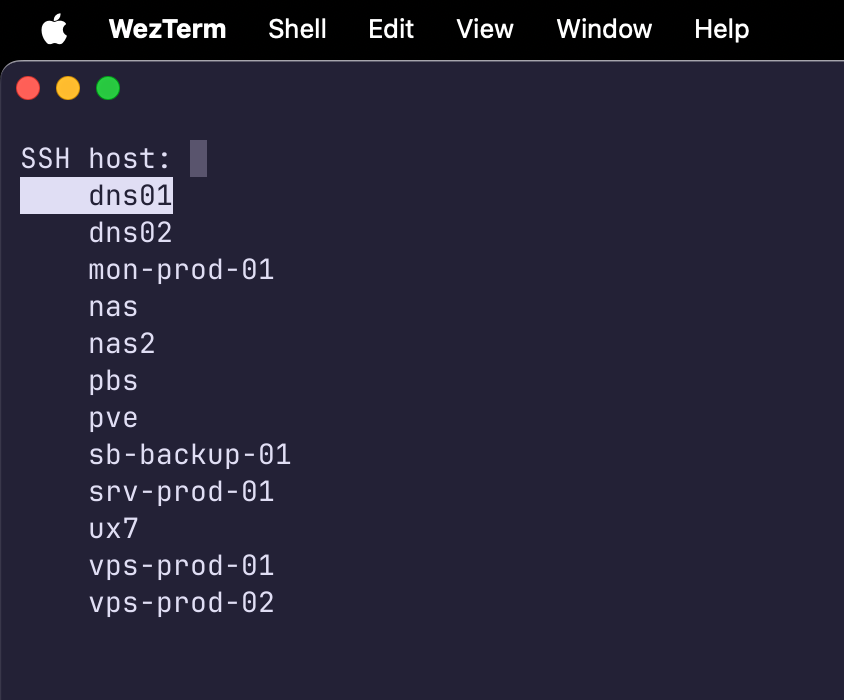
The result is a beautiful, easily accessible and fast SSH picker in my favourite terminal emulator: